Generous Circle · KYC and KYB onboarding
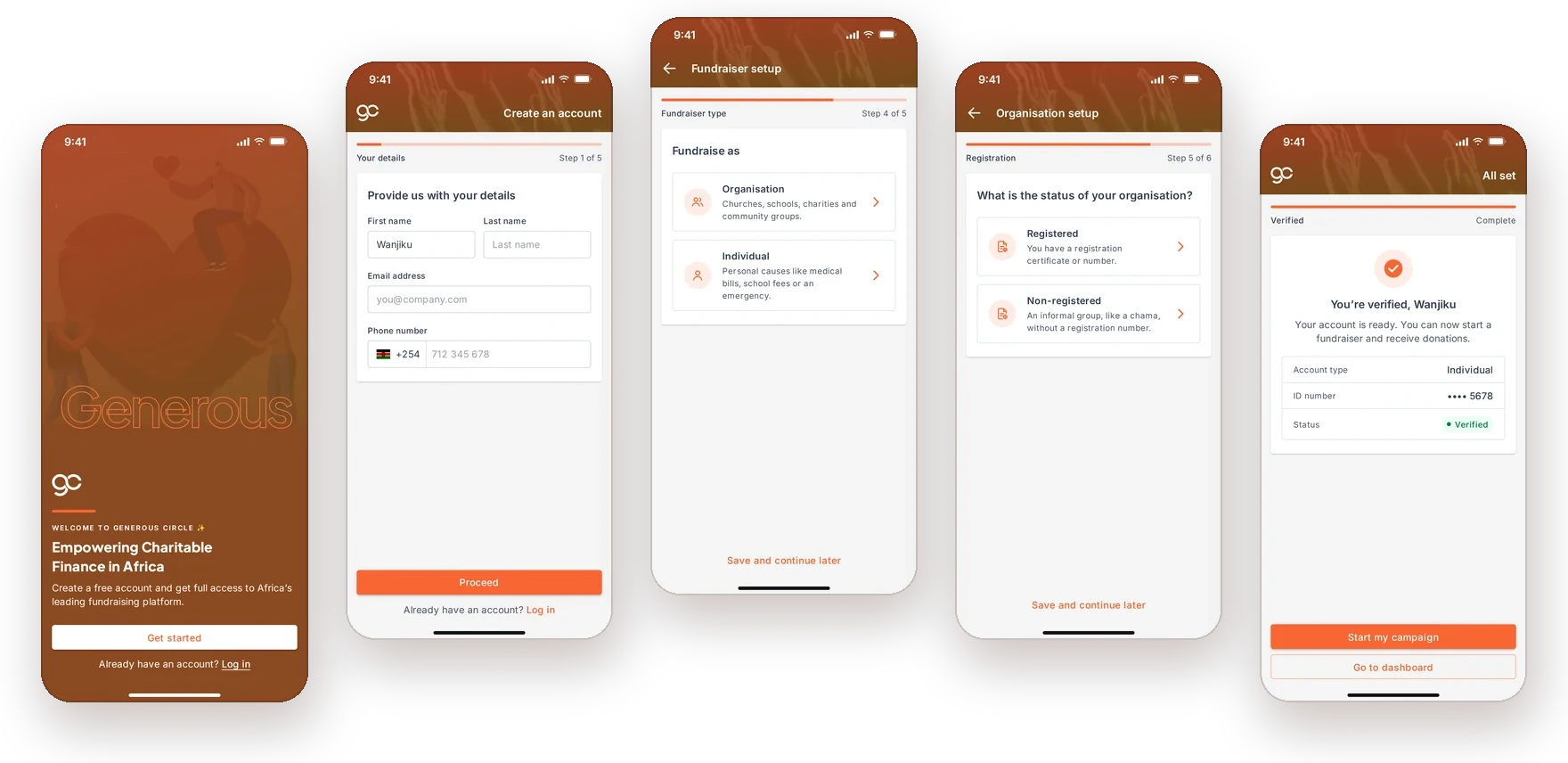
Verifying fundraisers from day one
Generous Circle was built from scratch, and as the founding designer I took its verification from concept to launch: a sign-up that collects what the Central Bank of Kenya requires, keeps fraud and gambling off the platform, and still gets individuals and organisations raising money quickly.
- Design lead
- Concept to launch
- User research
- User testing
- User onboarding
- Product
- Generous Circle, a crowdfunding platform
- My role
- Founding designer
- Timeframe
- 2024–2025
- Platforms
- Mobile first, and web
- Market
- Kenya
01
Introduction
Generous Circle is an Antler-backed crowdfunding platform for charitable giving in Africa. I joined at the very start as product lead, so there was no old product to redesign. Every screen here started from a blank page.
Because Generous Circle moves money, it is a fintech product, and in Kenya that comes with rules. Before anyone can raise funds, we need to know who they are. People prove who they are (KYC, Know Your Customer), and organisations prove they are real organisations (KYB, Know Your Business).
Most of the people we were building for would sign up on a phone, not a laptop. So I designed the flow mobile first, with a web version alongside it.
02
Objectives
- Meet the Central Bank of Kenya's requirements for customer and business information.
- Keep fraud and gambling off the platform, so money raised goes to real causes.
- Welcome every kind of fundraiser: individuals, registered organisations, and groups without a registration number.
- Work on the phone first, because that is where most people in Kenya would sign up.
03
Mapping who signs up
Everyone starts the same way: an account, a verified email and a password. Then the flow splits by who is raising the money, and each path only asks for what applies to it.
Everyone
- Create an account
- Verify email
- Set a password
- Choose fundraiser type
Individual · KYC
- National ID number
- Verified
Registered organisation · KYB
- Registration status
- Details and registration number
- In review
Group without registration · KYB
- Registration status
- Details, email and role
- In review
04
Design decisions
Structure
One shared start, then branch
Asking about the fundraiser type only after the account exists means nobody fills in fields that don't apply to them, and everyone gets through the first steps the same way.
KYB
Room for groups without paperwork
Plenty of community groups raise money together without a registration number. Rather than turn them away, they get their own path, giving an email and their role in the group in place of a registration number.
Mobile
Built for the phone in someone's hand
One task per screen, a progress bar with the step count, +254 already set on the phone number, the number keypad for the email code, and a way to save and continue later.
Endings
Always say what happens next
Individuals see that they're verified and can start a campaign straight away. Organisations see their registration is in review, and can still start drafting while the check runs.
05
The flow
Walkthrough 1 · Getting started
Create an account on the phone
The shared start, from the welcome screen to choosing how you want to raise money.
1. WelcomeOne clear action: get started, or log in.
2. Your detailsName, email and phone, with Kenya's +254 already set.
3. Verify emailA 4-digit code, typed on the number keypad.
4. PasswordThe rules are shown before the error, not after.
5. Fundraiser typeThe fork: raising as an organisation or as yourself.
Walkthrough 2 · KYC
Individuals: verified with an ID number
People raising money for themselves confirm who they are with their national ID number.
6. ID numberOne field, and one line on why we ask.
7. VerifiedVerified, with the next step right there.
Walkthrough 3 · KYB
Organisations: registered or not
Organisations say whether they are registered, and the details we ask for follow from that answer.
6. Registration statusRegistered or not decides what we ask next.
7. Registered detailsRegistered organisations add their registration number.
8. Non-registered detailsGroups without one give an email and their role instead.
9. In reviewThey can start a campaign while the check runs.
Walkthrough 4 · On the web
The same flow on a laptop
On a bigger screen the progress bar becomes a stepper down the side, so people can see every step at once.
1Your details
2Fundraiser type
3Organisation details
4In review
Recreated for this case study. The original Figma file was lost when its owner's account was closed.
06
How I led it
As the founding designer, I owned verification from the first concept to launch. I ran the research, shaped the flow, and worked with engineering to build it.
Handoff and adoption
Handoff, then onboarding real users
Once the screens were ready I handed them to engineering and stayed close through the build. After it shipped, I onboarded a handful of users and watched how they moved through verification. Some I walked through myself, especially organisations, pointing out which documents they needed. Most of it was user testing: less about helping, more about learning how people actually get verified so we could keep making it easier.