Beyonic, an Onafriq product · Team accounts
One account, many hands
I designed how Beyonic business owners bring their team into one account, so the people who run payroll, collections and payments can do their part while the owner keeps sight of everything.
- Product
- Beyonic, Onafriq's payments platform
- My role
- Product designer
- What I did
- User journey, UI, testing and iteration
- Platforms
- Web and mobile
- Users
- Small businesses and NGOs
01
One account, many jobs
A business isn't run by one person. Payroll is often handled by someone other than the owner. So are campaigns, bulk payments like salaries and bonuses, paying for services, collections and withdrawals.
Some owners also run more than one shop, each with its own way of taking money, and wanted it all collected under one umbrella.
The owner needed a way to bring the right people into the account, each doing their part, while still seeing everything that was running.
02
Owners and members
The account has two kinds of people. The Owner sets the business up, invites the team and can see everything. A Member joins through an invite and gets access to the parts of the business they work on.
Both see the same profile, with a small badge that makes the role clear. Only the owner sees business details, billing and the option to invite others.
03
Inviting the team
Inviting starts from the owner's profile. Emails are added one at a time, so each one can be checked or removed before anything is sent. A clear sending state and a confirmation close the loop, so the owner knows the invitations went out.
The same flow on mobile
1Profile
2Add an email
3Add more
4Sending
5Sent
6Pending invites
04
Start with view-only, then grow
We launched with a deliberately small set of permissions: invited members could view transactions and wallet balance. The banner on the invite screen says this up front, so owners know exactly what they're giving away before they send anything.
Over time, specific permissions were given to specific people, like running payroll or making payments, while the owner could still monitor everything that was running.
05
Managing the team
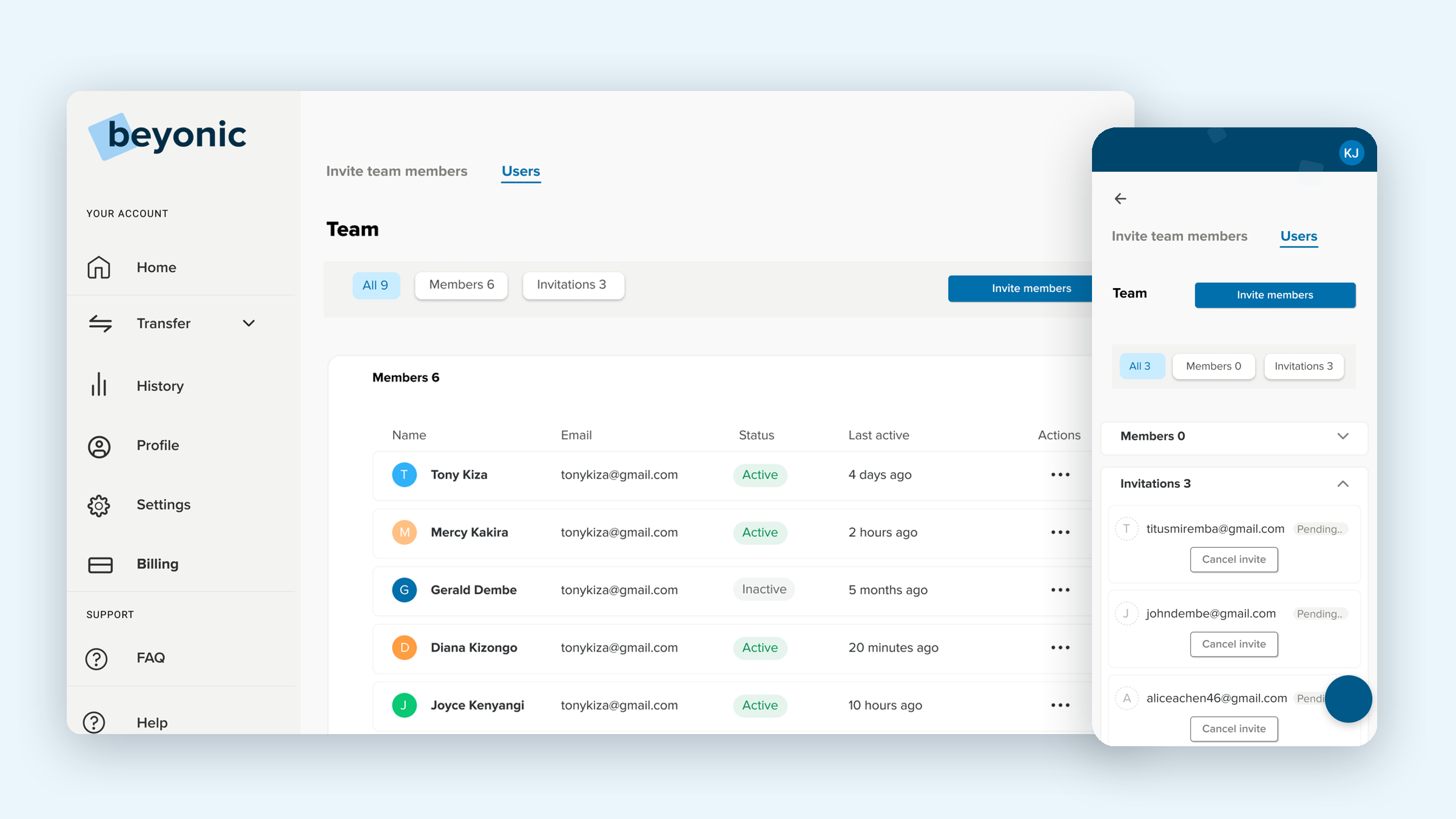
The Users tab is where the owner keeps track of everyone. Before anyone accepts, it shows an empty team and the pending invitations, each of which can be cancelled. Once people join, each member shows their status and when they were last active.
06
Testing and iterating
I built the user journey and the UI screens, then stayed close to the feature during testing.
Watch
I watched how people actually used the flow, not just whether they finished it.
Gather feedback
I collected feedback on which actions were unclear or needed another pass.
Iterate
I went back to the designs, made the changes and tested again.
07
After launch
Once it shipped, two groups made the most of it, and they used it in very different ways.
Small businesses
Several shops, one umbrella
Owners running more than one small business, like a photocopy shop next to a salon, used it to bring the money from each one together in one place.
NGOs
Paying a whole team
Bigger organisations, mostly NGOs, used it to run salaries and bonuses, with different people handling different parts of the work.